- Create a new Post or Add it to an existing post.
- Click on the TV icon
- Embed Video
- Browse to where it is saved
- Title it - this is what everyone will see as the name
- Select Upload
- The window will change
- Select the Local Video tab if it is not already active
- Select your video
- Click Insert
- A link to your movie will appear in the post body.
- Select a category
- Publish or Update the post
Tuesday, December 14, 2010
Add Video you Created to Your Blog
Embed your video into your blog.


Monday, December 13, 2010
Congratulations
 The students have been working on their keyboarding skills using UltraKey 5.0 during school hours and Typing Pal after school.
 Students should complete Lesson 5 by the end of Quarter 2, Dec. 17. They can practice at home 3 times a week using Typing Pal for 15 minutes at a time.
Username is first name, followed by fiirst intial of last name, follwed by 8 digit technology number. (NancyG20123456)
The expectations are:
3rd grade - 15 WPM with 94% accuracy (15/94)
4th grade - 20 WPM with 96% accuracy (20/96)
5th grade - 25 WPM with 98% accuracy (25/98)
We have several students who have completely finished UltraKey 5.0
3rd Grade
Julie 18/97 (Nov. 22)
4th Grade
Emily 45/98 (Nov. 24)
Shereen 25/96 (Nov. 23)
Henrick 23/95 (Nov. 23)
Justin 30/96 (Nov. 23)
Henry 33/96 (Nov. 23)
Catherine 55/98 (Nov. 22)
Sue - 28/98 (Nov. 22)
Coco - 35/98 (Nov. 22)
Kelly 47/98 (Nov. 22)
5th Grade
Edward 45/98 (Dec. 13)
Max 38/98 (Dec. 13)
Clara 30/98 (Dec. 13)
Jasper 35/98 (Dec. 13)
Max 38/98 (Dec. 13)
Emily 28/98 (Dec. 13)
Asia 52/98 (Dec. 13)
Eli 35/98 (Dec. 13)
Janice 75/98 (Dec. 13)
Mia 29/98 (Dec. 13)
Melissa 35/98 (Dec. 13)
Lia 30/98 (Dec. 13)
Max 38/98 (Dec. 13)
Clara 30/98 (Dec. 13)
Jasper 35/98 (Dec. 13)
Max 38/98 (Dec. 13)
Emily 28/98 (Dec. 13)
Asia 52/98 (Dec. 13)
Eli 35/98 (Dec. 13)
Janice 75/98 (Dec. 13)
Mia 29/98 (Dec. 13)
Melissa 35/98 (Dec. 13)
Lia 30/98 (Dec. 13)
Brent 56/100 (Nov. 22)
Nicholas 44/98 (Nov. 22)
Monica 98/99 (Nov.22)
Nicholas 44/98 (Nov. 22)
Monica 98/99 (Nov.22)
Congratulations to all. There are many more who will be joining this list very shortly!
Wednesday, December 8, 2010
Real or Not
Select one of the websites and determine if it is a reliable website or a hoax (something intended to trick or deceive). Leave a detailed comment explaining why you think it is a real website or why you think it is a hoax. Use the questions at the bottom to help you decide. Answer, at a minimum, one question from each area.
Google Technology
Google Translate for Animals
Buy an Ancestor Online
Pacific Northwest Tree Octopus
Boilerplate
Very Exciting Fredericton
Cat Reactions to Bearded Men
Authority
Currency
Content/Purpose
Audience
Structure/Workability
Google Technology
Google Translate for Animals
Buy an Ancestor Online
Pacific Northwest Tree Octopus
Boilerplate
Very Exciting Fredericton
Cat Reactions to Bearded Men
Authority
- Who is responsible for the site?
- Is this site published by a person, an organization or a company?
- What are their credentials?
- Do they have any Expertise or experience on the topic?
- Is the information they provide likely to be reliable and trustworthy?
Currency
- How current is the site?
- Are there broken links?
- Is the information outdated?
- Is this information which needs to be constantly updated?
Content/Purpose
- Why does this site exist?
- What sort of information can I get from this site?
- Is the site designed to inform or entertain?
- Is this site trying to sell me something?
Audience
- Who is this site aimed at?
- Is the site easy to read?
- Does the overall design “look and feel” meet the needs of the audience?
Structure/Workability
- How easy is the site to use?
- How easy is to find the information I need?
- Do the pages load quickly?
- Could I use this site if I had a disability? (visually impaired: it can be read aloud or enlarged)
- Would I come back to this site in the future?
Thursday, December 2, 2010
How to Add Captions to Pictures in PowerPoint 2007
You can place captions under the pictures in your PowerPoint photo album. PowerPoint initially places the picture filename in the caption, but you can delete this caption and enter one of your own. To add captions follow these steps:
1. Open the Photo Album dialog box.
On the Insert Tab click the Photo Album button.
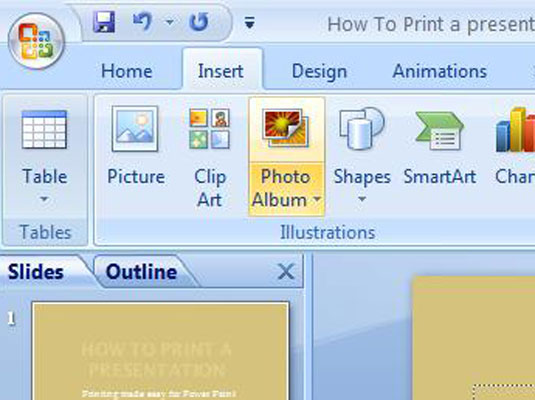
2. Open the Picture layout drop-down list to Fit to Slide.
Layout options are displayed.

3. Click the Captions Below ALL Pictures check box.

Wednesday, December 1, 2010
Renewable Energy Video
This is an exemplar for the 4th grade renewable energy project. The word were written by Anna in Mr. Hudson's class. The slides and narrations were created by me for the students to use as an example. Images were hyperlinked in PowerPoint and the links are added as a Credit slide for the movie.
[local /files/2010/12/RenewableEnergy1.wmv]
[local /files/2010/12/RenewableEnergy1.wmv]
Subscribe to:
Posts (Atom)